

(CVE Referenced in CIS Advisory 2026‑040)
A newly disclosed OpenSSH vulnerability—highlighted in the Center for Internet Security (CIS) advisory’s A Vulnerability in OpenSSH Could Allow for Authentication Bypass (2026‑040—has put many organizations on alert. The issue affects OpenSSH 10.2 and earlier, and depending on configuration, may allow an attacker to bypass authentication controls.
If your environment includes Linux, UNIX, BSD, or network appliances that rely on OpenSSH, you need a fast, reliable way to identify which machines are running vulnerable versions.
Device42 makes this easy to identify if you have any machines running vulnerable versions.
With Device42’s built‑in Standard Reporting and DoQL, you can instantly locate every device running OpenSSH 10.2 or earlier—no scripts, no agents, no manual scanning.
This guide walks you through exactly how to do it.
Why Device42 Is Ideal for Vulnerability Identification
Device42 continuously discovers software installed across your infrastructure—servers, VMs, network devices, and more. Because OpenSSH is detected as part of standard software discovery, you already have the data you need.
Using Device42’s Standard Reports, you can:
- Search for specific software titles
- Extract version numbers
- Normalize version strings
- Flag devices that fall within a vulnerable version range
- Export results for patching teams or SIEM ingestion
All without leaving the UI.
Step 1 — Navigate to Standard Reports
In the Device42 UI:
- Go to Analytics
- Select Standard Reports
- Choose Create DoQL Standard Report
This opens the SQL editor where you can paste the query below.
Step 2 — Run the OpenSSH Vulnerability Report
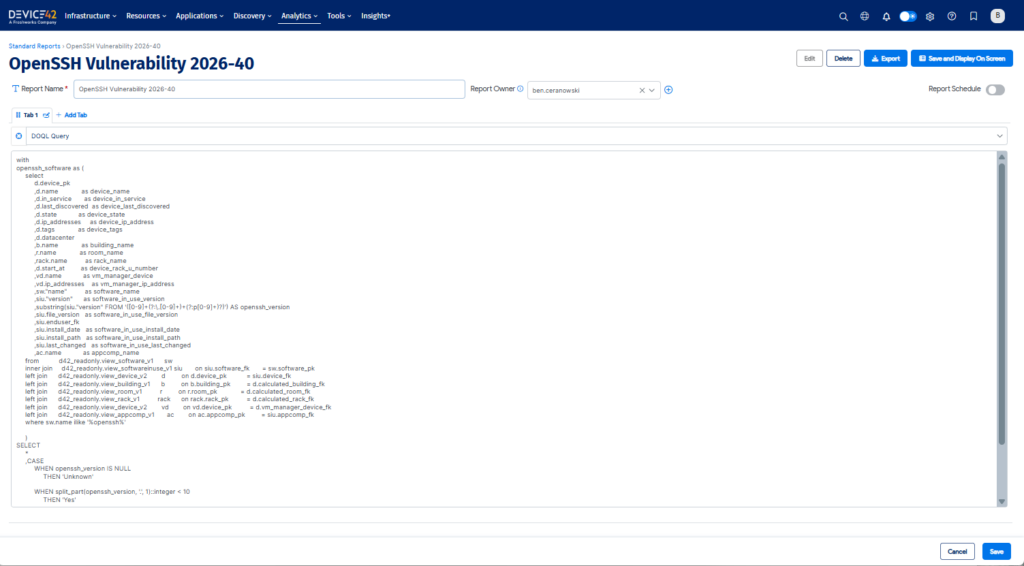
Paste the following SQL into the Standard Report DOQL Query editor.
This query:
- Identifies all software entries matching “OpenSSH”
- Extracts the version number
- Normalizes it for comparison
- Flags any version 10.2 or earlier as at risk
with

openssh_software as (
     select
          d.device_pk
          ,d.name             as device_name
          ,d.in_service       as device_in_service
          ,d.last_discovered  as device_last_discovered
          ,d.state            as device_state
          ,d.ip_addresses     as device_ip_address
          ,d.tags             as device_tags
          ,d.datacenter
          ,b.name             as building_name
          ,r.name             as room_name
          ,rack.name          as rack_name
          ,d.start_at         as device_rack_u_number
          ,vd.name            as vm_manager_device
          ,vd.ip_addresses    as vm_manager_ip_address
          ,sw."name"          as software_name
          ,siu."version"      as software_in_use_version
          ,substring(siu."version" FROM '([0-9]+(?:\.[0-9]+)+(?:p[0-9]+)?)') AS openssh_version
          ,siu.file_version   as software_in_use_file_version
          ,siu.enduser_fk
          ,siu.install_date   as software_in_use_install_date
          ,siu.install_path   as software_in_use_install_path
          ,siu.last_changed   as software_in_use_last_changed
          ,ac.name            as appcomp_name
     from           d42_readonly.view_software_v1      sw
     inner join     d42_readonly.view_softwareinuse_v1 siu       on siu.software_fk       = sw.software_pk
     left join      d42_readonly.view_device_v2        d         on d.device_pk           = siu.device_fk
     left join      d42_readonly.view_building_v1      b         on b.building_pk         = d.calculated_building_fk
     left join      d42_readonly.view_room_v1          r         on r.room_pk             = d.calculated_room_fk
     left join      d42_readonly.view_rack_v1          rack      on rack.rack_pk          = d.calculated_rack_fk
     left join      d42_readonly.view_device_v2        vd        on vd.device_pk          = d.vm_manager_device_fk
     left join      d42_readonly.view_appcomp_v1       ac        on ac.appcomp_pk         = siu.appcomp_fk
     where sw.name ilike '%openssh%'

     )
SELECT
     *
     ,CASE
          WHEN openssh_version IS NULL
               THEN 'Unknown'

          WHEN split_part(openssh_version, '.', 1)::integer < 10
               THEN 'Yes'

          WHEN split_part(openssh_version, '.', 1)::integer = 10
           AND regexp_replace(split_part(openssh_version, '.', 2), '[^0-9].*$', '')::integer < 3
               THEN 'Yes'

          ELSE 'No'
     END            AS at_risk
FROM openssh_software;
Step 3 — Review the Results
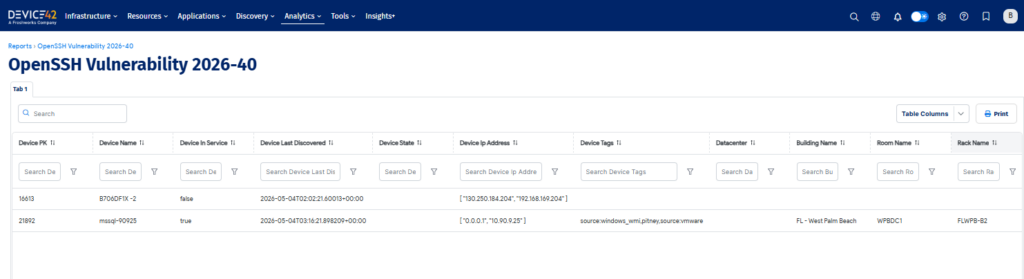
Your report will return:
- Device name
- IP address
- Location (building, room, rack)
- Virtualization manager
- Installed OpenSSH version
- Normalized version
- At‑risk flag (Yes / No / Unknown)
This gives you a complete, infrastructure‑wide view of exposure.
Step 4 — Export and Take Action
From the report screen, you can:
- Export to CSV
- Share with security or operations teams
- Feed into patching workflows
- Track remediation progress
Because Device42 continuously discovers software, rerunning the report after patching will immediately confirm whether systems have been updated.
Why This Matters
Authentication‑bypass vulnerabilities are among the most dangerous classes of security flaws. When they affect foundational components like OpenSSH, the risk spans:
- Linux servers
- Network appliances
- Storage systems
- Virtualization hosts
- Embedded devices
Device42 gives you the visibility needed to respond quickly and confidently.
Stay Ahead of Emerging Threats
This OpenSSH advisory is a reminder of how critical accurate software inventory is. Device42’s discovery engine and reporting tools help you:
- Detect vulnerable software versions
- Prioritize remediation
- Reduce attack surface
- Strengthen compliance posture
If you’re already a Device42 customer, you can run the report today. If not, this is a perfect example of the visibility Device42 brings to your environment.
