

D42-46554 – Added a global setting for admins to hide the ‘Advanced Reporting’ menu for all users. It is still possible to enable and disable the entire Advanced Reporting service in the Appliance Manager. Please note: Advanced Reporting will be removed from the product before March 2027. We are in the process of adding similar capabilities to either Standard Reports or Insights+.
Release Date: June 2nd, 2026.
Release Overview
Updating Device42 to version 19.09.00
Upgrading to 19.09.00 is possible from 19.05.10 or above. If you need to first upgrade to Version 19.05.10, please see those release notes for details. A link will also be provided when requesting an upgrade. We recommend making a backup of your system before any upgrades.
For up-to-date information, notifications of outages or maintenance, visit our status page at: https://device42.freshstatus.io/
The 19.09.00 MA release contains the following features:
Enhanced last login detection
D42-34682 – Detecting the last user logged into a Windows device has been enhanced to pull from the event logs, we search for interactive local login events (EventID:4624, Type ID:2). This ensures the last login date and time are accurate and will not be affected by service accounts and non-local logins. In the event we’re unable to pull eventIDs, we’ll fall back to the current method pulling from winevents.
Performance Improvements
Intune Discovery has been reworked to be significantly faster (D42-46574). This includes multi threaded requests and larger batch queries, all Intune discoveries should be faster, but this will be more noticeable in environments with 30k+ devices.
Adjusted postgres memory settings that should help performance overall (D42-47101). Note: Many times performance impacts are the result of significantly large tables. Adjusting the retention period on audit table records, or utilizing autoclean rules to clean up unnecessary data typically helps more than memory optimization settings.
Improved the performance is device exports by about 300% (D42-47035), this prevents timeouts on large data sets being exported (20k+ devices)
Improved the performance of VLAN indexing in SNMP discovery jobs (D42-46980). This will only affect switches that have many VLANs.
SCCM discovery of large environments would sometimes fail (D42-46879). The payload request can now be split into multiple calls that will process correctly.
Improved the performance of the time it takes to upgrade the local collector on the MA (D42-46586), this will result in significantly faster upgrades for some customers.
Integration Enhancements
D42-44925 – Added an alert when an ITSM integration fails to successfully complete
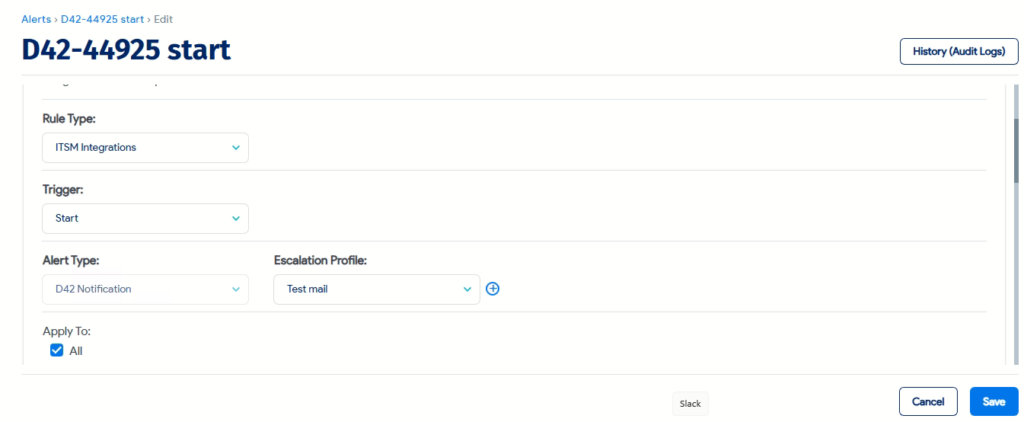
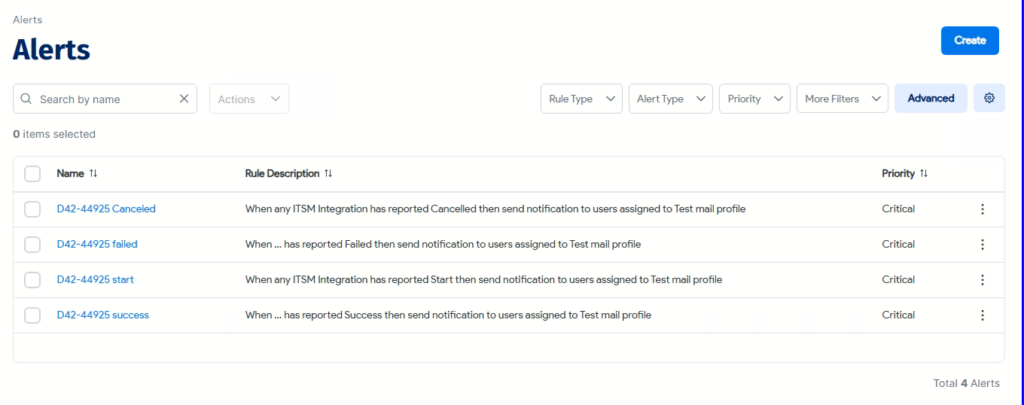
D42-47469 – Increased timeout for a websocket connection to 20 seconds to prevent sync failures
Security updates
Across many aspects of Device42 security has been enhanced. Including updating core OS dependencies and libraries, in product protections, and appliance configuration.
D42-46848 – Updated Rocky Linux OS packages and libraries
D42-47727 – Updated additional included libraries to resolve known security issues.
D42-46942 – Fixed an XSS vulnerability on several pages
D42-46481 – Updated additional packages identified in security scans
D42-45025 – Fixed a bug where its possible to still edit an object immediately after changing the object category to one you no longer have access to
D42-46047 – IIS discovery could sometimes gather connection strings and other sensitive information if it is discovered on an IIS instance in the site configuration string. Note: The sensitive values are still in your IIS instance in plain text and should ideally be resolved using more secure methods. However, we will no longer mirror this insecure information in our system
D42-43674 – Fixed a remote command injection attach in the appliance manager SNMP output module
Minor UX enhancements and usability improvements
The following minor enhancements have been added to Device42:
- D42-46923 – Super Users can view all users’ InsightsAI chat history. Non superusers will only be able to view their own chat history
- D42-43791 – Added the VRF name to the IP addresses grid view, and the dropdown when selecting an IP address on a device to make it easier to select the correct IP
- D42-46619 – Adjusted the system to not reach out to pypi.org for version checks, updates to the package are handled internally
- D42-46554 – Added a global setting for admins to hide the ‘Advanced Reporting’ menu for all users. It is still possible to enable and disable the entire Advanced Reporting service in the Appliance Manager. Please note: Advanced Reporting will be removed from the product before March 2027. We are in the process of adding similar capabilities to either Standard Reports or Insights+.
- D42-46578 – SAML authentication will not attempt standard validation with the IP provided, and if that fails, it will strip the port suffix and revalidate before failing. Some AWS implementations will include this difference, which may cause authentication failures
- D42-42940 – Added customer name and hardware model to the rack layout view when selecting a device on a rack
- D42-46543 – Discovery hub will now skip the subnet and broadcast address on /24 subnets (.0 and .255) resulting in slightly faster scans and not sending unwanted traffic.
- D42-46483 – Discovery hub will use any custom name server input, but when nothing is input in the name server, the scan will now fall back to the –system-dns provided and should provide better results for some discovery hub scans.
- D42-46352 – Rebranded EnrichAI in the UI and documentation. This is a naming change with no impact on the Device42 Enrichment service functionality
- D42-46469 – Fixed a visual bug that would cause the first character of a 4 character OTP to not display in the appliance manager when attempting to access the shell
- D42-42752 – Added more information to Intune discovery. We will now import the BIOS information
- D42-46448 – Cloud discovery jobs will default to not logging all debug entries by default. This can still be enabled for troubleshooting, existing jobs will be unaffected
- D42-46388 – Fixed an issue with email failing to be sent due to an SSL issue, even when SSL is disabled. As a best practice we recommend using SSL
- D42-46338 – The suggest subnet feature will now ignore assigned parent subnets and will no longer suggest invalid options when the “If Parent Assigned Ignore Path” field is set
- D42-45989 – DOQL queries now support curly brackets {.}
- D42-46079 – Improved the logic for unprocessed device records, items will not re-appear once merged
- D42-45685 – It’s now possible to manually set the power unit serial number, as this value is not always discoverable
- D42-45576 – Updated the scheduled sync times and windows for CRE to not conflict
- D42-45506 – Fixed an issue where the warning for running out of storage licenses would not show correctly
- D42-45316 – Improved selection of tags on the devices page and you can now more easily select them with keyboard control only
- D42-45300 – Fixed the behavior of yes/no toggle switches when they were mandatory on the page
- D42-45157 – Improved the rack export to include rack data, and the correct available U’s value
- D42-44988 – Citrix Xen discovery will now set the host for powered off VMs in addition to powered on VMs
- D42-44311 – Non super users can now see devices associated to a business service
- D42-44185 – Added several missing audit trail records to the device audit trail that only showed up in the history (audit logs)
- D42-44182 – Non super users can now export resources they have access to
- D42-43289 – Fixed an issue where application group calculation may get stuck
Discovery fixes and enhancements
- D42-46219 – Azure cloud discovery will now discover virtual machine scale sets
- D42-44554 – AWS cloud discovery will now discovery elasticache clusters
- D42-46046 – Azure discovery will now add function apps and properly filter out plans
- D42-46472 – Added support for Quanta ILO switches
- D42-45514 – Added support for Integrated Lights Out 7 devices
- D42-46342 – Added support for Hikvision devices
- D42-44344 – Added support for additional Arris branded devices
- D42-45371 – Added support for DCN and additional Quanta switches
- D42-43558 – Added support for TufinOS devices
- D42-43335 – Added support for Fortinet FortiADC devices
- D42-44280 – Windows discovery will now gather the SMBIOSAssetTag value from Win32_SystemEnclosure
- D42-43878 – Azure discovery will now classify Recovery Services Vaults separately from Key Vaults
- D42-43785 – The ignore powered off VMs setting will now also apply to inactive logical domains on solaris devices
- D42-44303 – Fixed a bug in AWS discovery where some Route53 records would not be discovered
- D42-44216 – Fixed a bug in Azure cloud discovery where the task may crash if API calls for associated resource group fail
- D42-47912 – Fixed a bug with the region sometimes being incorrectly detected in EKS discovery
- D42-47824 – Fixed a bug that could prevent KVM discovery from showing as completed
- D42-47732 – Fixed an issue where the used by field would not be correctly cleared out with JAMF discovery
- D42-47703 – Fixed an issue where the used by field would not be correctly cleared out with InTune discovery
- D42-43295 – Fixed and issue where the IP address was not properly updated with InTune discovery
- D42-47366 – Fixed a bug that could cause some power banks to not show the correct bank number.
- D42-47238 – Fixed a bug with vCenter discovery that would bring in subnets with the wrong name format
- D42-47232 – Fixed a bug with Oracle discovery that would prevent collection of connection data from the config file, leading to a permission related error
- D42-47228 – Fixed a bug with the hardware model names of some HP PDUs
- D42-47223 – Fixed a bug with device name logic on Zebra printers discovered via SNMP
- D42-47026 – Fixed a problem with names and serials sometimes not being discovered on Cisco ASA devices
- D42-46981 – Fixed an bug in Azure discovery where undefined subnets may cause some private IP addresses to be missed
- D42-46976 – Fixed an issue in DHCP integration and calculated subnet begin and end values with exclusions in the range
- D42-44757 – Fixed a bug that would cause some SDWan devices to not show success and failures in job results.
- D42-46644 – Fixed a bug with GCP discovery where SQL instances with no ip may fail to be brought in
- D42-46735 – Fixed a bug where importing an Insight+ dashboard with the same name may indicate success, but not properly import
- D42-46643 – Fixed an exception error when discovering HPE Oneview 10.0
- D42-46725 – Fixed an error when Discovering Cisco ACI devices when we are unable to gather management IPs
- D42-46526 – Improved the logic in parentage of self signed certificates discovered. When a certificate is re-issue, it will no longer attribute the new certificate to the old, even if the ‘issuer’ matches the ‘issued_to’
- D42-46487 – Fixed a crash in Openstack Discovery when certain attributes were missing
- D42-46410 – Fixed a bug in SaaS discovery that could cause the process to hang and not complete the job
- D42-46395 – Fixed the strip domain name setting with Kubernetes discovery and Openshift devices
- D42-46354 – Fixed an issue where some Redfish discoveries may fail to complete and are killed after 24 hours
- D42-45892 – Fixed a secondary issue where some Redfish discoveries may not complete
- D42-46231 – Fixed an issue with power store discovery sometimes not working when upgrading from an older version
- D42-45901 – Fixed a VMware discovery issue where large environments may not always import the correct number of devices (10k+ VMs)
- D42-45677 – Fixed an issue where some solaris physical devices were classified as virtual devices
- D42-45458 – Fixed an issue with the hardware model detection of Aruba APs
- D42-44982 – Fixed a memory leak when discovering Oracle databases
- D42-44619 – AS400 discovery will now gather correct Serial Model and OS data even when some commands fail due to permission
- D42-39758 – Fixed and issue that would AS400 discovery via FTPs to fail
- D42-44428 – Fixed a bug where some EC2 instances would not be discovered if PrivateIPAddresses/PrivateIPAddress was missing
- D42-44190 – SaaS discovery jobs will now correctly use proxy configuration from the RC
- D42-43943 – Fixed an exception that may occur when discovering HP KVMs via SNMP
- D42-43875 – Fixed a bug where the incorrect port used for discovery is displayed on some WinRM discovery job scores
- D42-43556 – Fixed a bug where SNMP scans of X9 Oracle servers may be incorrectly detected as a solaris router
- D42-42953 – Fixed an issue with HPE Oneview discovery crashing when certain fields were blank
- D42-42853 – Added deduplication logic to Intune/SCCM software discoveries, sometimes multiple endpoints would return the same software records
API enhancements
The API documentation is available at: https://api.device42.com/.
- D42-47743 – Fixed an issue with the documentation of the /api/1.0/auto_discovery/cloudaccount/ call. The API is unchanged.
- D42-47040 – Fixed a type in API documentation for clusters (devices_in_cluster_ids)
- D42-47036 – When adding custom fields to a device, the name serial or asset number can now be used
- D42-46690 – Enhanced the remove_password_ids parameter to affect both OS and DB objects, previously you could only remove OS credential via API
- D42-46216 – Fixed several typos in the swagger documentation
- D42-44577 – Fixed a bug with the /device/rack API endpoint failing with ‘auto’ rack positioning
- D42-44778 – Fixed an issue in AD/LDAP sync when importing objects with parenthesis (.)
Other Enhancements and Customer requested fixes
- D42-47729 – Fixed an error when backing up to an NFS server
- D42-47581 – Added “Last Discovered” to the list of fields that do count as a record change. The list is now: action_time, date_updated, debug_text, delete_date, discovered_count, failure_count, free_capacity, job_id, json, last_changed, last_discovered, last_edited, last_failure, last_login, last_reported_state, last_scheduled_run, last_status, last_timeout, last_updated, license_hints, mt_building_id, mt_rack_id, mt_room_id, nonce, normalized_bladeno, normalized_number, normalized_port, normalized_rack, number_consecutive_timeouts, priv_key, private_key, pub_key, public_key, rc_priv_key, rc_pub_key, rc_ru_key, record_created, remote_log, remote_port_id, run_report, start_time, state, stats
- D42-47230 – Fixed a bug that caused records in the ‘django_session’ table to not be cleaned up properly.
- D42-47188 – Fixed an issue with incorrect timestamps on some discovery scores
- D42-47126 – Restricted default Business Service Types from being able to be deleted, as this caused errors. They can be renamed, but not removed.
- D42-47095 – Fixed a visual sorting bug with the scheduled job density report.
- D42-47063 – Fixed a bug within the subnet tree that caused some subnets to be cut off
- D42-47045 – Reports sent from Insights+ will now use the “D42 URL for SaaS apps” in links instead of an IP address
- D42-47008 – Fixed an issue with importing purchases as a non super user when RBAC is enabled
- D42-47000 – Fixed an issue where business service elements sometimes may not have a visible name
- D42-46794 – Fixed an issue with the upgrade readiness, sometimes system packaged would incorrectly fail.
- D42-46874 – Updated patch panel and switch port mapping to ensure no cables loop back to the same switch port and now each cable should terminate on the correct patch panel port.
- D42-46824 – Fixed a bug where non super users without building hierarchy permissions would see too many menu items.
- D42-46550 – Fixed a bug that would cause some scheduled auto-clean rules to not execute properly
- D42-46471 – Fixed a bug preventing the audit log from properly displaying contract service audit log entries
- D42-46308 – Fixed a bug with the display of power usage on rooms sometimes showing higher than expected
- D42-46084 – Fixed an issue with global search not displaying all records that match the search
- D42-46128 – Inputting an incorrect NTP server would cause a long delay in the appliance manager before timing out
- D42-46045 – Fixed the advanced filters for archived objects
- D42-45986 – Fixed an issue where the autocomplete column on the unprocessed device records view would error out.
- D42-45940 – Fixed and issue when using backspace to remove a negative latitude or longitude would not properly clear the values
- D42-45905 – Fixed an issue where permissions were not properly set when backing up to an NFS server
- D42-45192 – Fixed a bug where service instances would only show on the edit page and would be missing on the view page of an end user
- D42-44558 – Fixed a bug with advanced search not showing all records when filtering on a yes/no custom field
- D42-44479 – Fixed a bug where NMAP scans would gather service and version detection even if the setting was disabled
- D42-43823 – Fixed a caching issue where the application groups view could sometimes be blank
- D42-43831 – Fixed a bug in the agent OS detection when using the ‘-service ports-only’ switch
- D42-43799 – Fixed a bug with vServer re-imports where the http and https values would not be preserved correctly
- D42-43748 – Fixed and issue with auto clean rules being unable to archive devices with deleted picklist values set
- D42-43741 – Disabled users no longer appear in the owners dropdown of Insights+ alerts
- D42-43236 – Fixed an issue where the bitlocker status may be incorrect via agent discoveries
- D42-43086 – Cloning a device now also correctly clones the object category
- D42-42911 – Fixed a bug in the backup space requirements that did not consider temp files and could cause backup failures
Known Issues:
- D42-48031 – Mismatch in device counts between CRE/RU Inventory reports and corresponding UI pages for Operating System data
- D42-40349 – Generic Import Tool trims custom fields with ‘:’ character
- D42-38249 – Users are not notified if they lack view permissions
- D42-39359 – Enrichment services allow editing button mistakenly
- D42-39404 – Improve performance when sorting and filtering with the ‘Location’ column
- D42-39344 – Object Category field is visible on Power Units detail page when RBAC is disabled
- D42-38512 – Spacing Issue on Hypervisor Discovery Page
- D42-40799 – AWS Discovery may fail to collect subnet details for Elastic Load Balancer resources when more than 1 region is defined
- D42-47430 – Palo Alto Devices get changed to printers after discovery
- D42-47262 – Rated Power not showing on banks
- D42-45361 – The ‘Applies” advanced filter is not displayed in the predefined report landing page.
- D42-44657 – Last login is updated for all the apps in G Suite discovery
- D42-44237 – In the AD/LDAP Sync page, the field name (Departments) and link name(Add Cost Center) don’t match
- D42-46834 – FIxed an issue where links to business services in some Insights+ reports would not work correctly
- D42-43634 – Fixed a bug where it may not be possible to save a device update after adding and deleting file attachments
Latest Device42 Update
Download the current update for Device42 here.
Depending on the version you are upgrading from, you may have to install an incremental update first: 18.14 > 19.00 > 19.05 > 19.09
If you haven’t tried Device42 yet, download a 14-day free trial!
