

Following is a quick workaround to find shadow IT or external providers that your services are connecting to when doing application mapping.
Macro code
Private Const AF_UNSPEC As Long = 0
Private Const AF_INET As Long = 2
Private Const AF_INET6 As Long = 23
Private Declare PtrSafe Function Socket Lib "ws2_32.dll" Alias "socket" (ByVal af As Long, ByVal stype As Long, ByVal Protocol As Long) As Long
Private Declare PtrSafe Sub CopyMemory Lib "kernel32" Alias "RtlMoveMemory" (Destination As Any, Source As Any, ByVal Length As Long)
Private Declare PtrSafe Function GetHostByAddr Lib "ws2_32.dll" Alias "gethostbyaddr" (haddr As Long, ByVal hnlen As Long, ByVal addrtype As Long) As LongPtr
Private Declare PtrSafe Function InetAddr Lib "ws2_32" Alias "inet_addr" (ByVal cp As String) As Long
Private Declare PtrSafe Function lstrlenA Lib "kernel32" (ByVal Ptr As Any) As Long
Public Function GetHostName(ByVal Address As String) As String
    Dim hSocket As Long
    Dim AddressType As Long
    Dim lLength As Long
    Dim lRet As LongPtr
    hSocket = Socket(AddressType, 1, 6)
    If hSocket = 0 Then
        MsgBox ("Failed to create socket!")
        Exit Function
    End If
    lRet = GetHostByAddr(InetAddr(Address), 4, AF_INET)
    If lRet <> 0 Then
        CopyMemory lRet, ByVal lRet, 4
        lLength = lstrlenA(lRet)
        If lLength > 0 Then
            GetHostName = Space$(lLength)
            CopyMemory ByVal GetHostName, ByVal lRet, lLength
        End If
    Else
        GetHostName = ""
    End If
End Function
Adding Macro to Excel
[responsive]
[/responsive]
[/responsive]
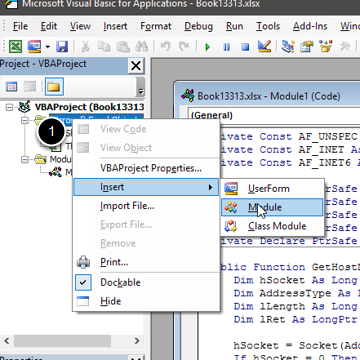
Alt + F11, then insert > Module and copy paste the above code.
Saving with the macro
[responsive]

[/responsive]
[/responsive]
To use the macro next time you open the file, make sure to save it as macro enabled workbook
Using the Macro
[responsive]
[/responsive]
[/responsive]
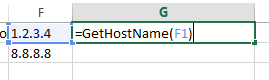
Simple working of the macro is as below:
=GetHostName("1.2.3.4")
To use in the excel, just add a new column and refer to the IPs column to get reverse DNS lookup.
