Migration to Cloud Services: Best Practices for Planning, Execution, and Optimization
Migrating workloads to the cloud is one of the most consequential infrastructure decisions an organization can make and also one of the most complex to execute well. Done right, it unlocks scalability, reduces operational overhead, and positions the business for long-term agility. Done poorly, it introduces downtime, cost overruns, and security gaps that can take months to untangle.
The difference between a successful migration and a costly one almost always comes down to process. Whether you’re moving a handful of applications or an entire data center, cloud migration follows three distinct stages: planning and assessment, execution, and post-migration optimization.
In this article, we cover the best practices for each stage and what to watch out for along the way.
| Migration Stage | Key best practices |
|---|---|
| Planning and assessment | A successful migration starts long before any workload moves. Assessment:
Design:
|
| Execution | Execution is about following the sequence and validating as you go, testing each phase to avoid unexpected failures:
|
| Post-migration and optimization | The post-migration phase is where you prove that the environment is stable, secure, and ready for subsequent actions:
|

Planning and assessment
Most migration failures can be traced back to shortcuts taken before a single workload ever moved. The planning and assessment stage is where you build the foundation on which everything else depends, and where the temptation to rush is strongest. It breaks into two distinct activities: understanding what you have, and deciding how you’re going to move it.
Assessment
Start with a thorough audit of your current environment. That means cataloging every server role, application, and dataset, and not just the things you know about. That should include all the workloads that have quietly accumulated over the years and rarely show up in conversations. Cloud-native tools like AWS Migration Hub and Azure Migrate handle discovery for workloads already living in those ecosystems, but most environments include legacy platforms, on-premises servers, and shadow IT that these tools won’t surface on their own.
A CMDB platform with automated discovery covers this gap. Device42, for example, uses a combination of agentless techniques (e.g., SSH, WMI, SNMP, API queries, and NetFlow) to discover hardware, virtual machines, containers, software installations, and cloud resources across heterogeneous environments. That includes legacy platforms like HP UX, AS/400, and Solaris that many discovery tools skip entirely. The result is a complete inventory of configuration items (CIs) before you’ve made a single migration decision. See Device42’s guide to CMDB discovery techniques for a breakdown of how these methods work in practice.
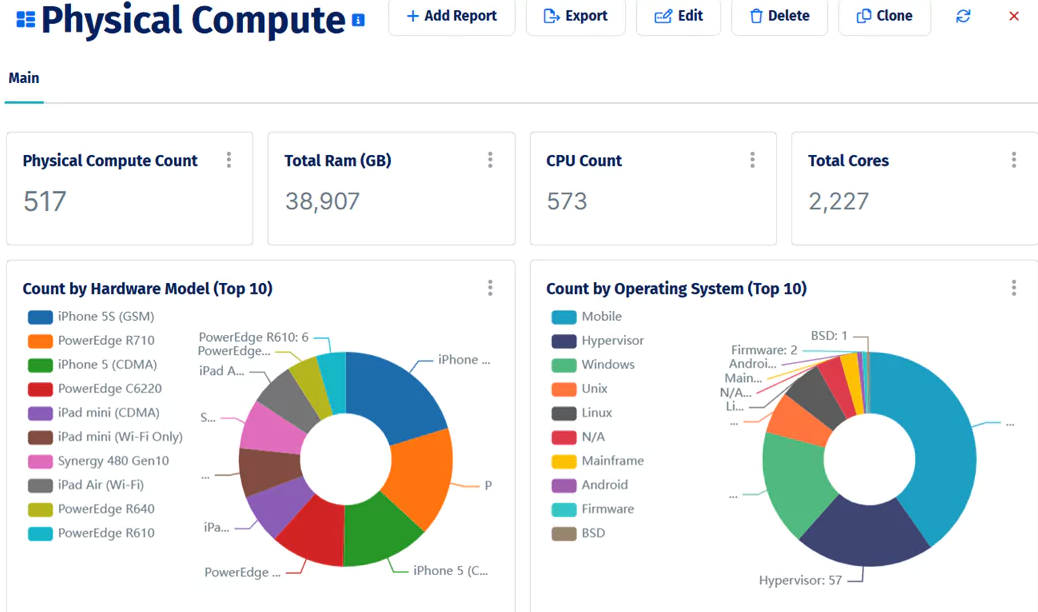
A breakdown of physical compute assets by hardware model and operating system, part of Device42’s post-discovery inventory view.
Once you know what you have, define what success looks like at the end. Vague goals like “move to the cloud by Q3” are not useful here. You need measurable targets:
- Cost: What’s the expected monthly cloud spend vs. the current on-prem operational cost?
- Timeline: What are the migration wave deadlines and the final cutover date?
- Performance: What are the latency, throughput, and availability targets for migrated workloads?
- Recovery: What are your RTO (Recovery Time Objective) and RPO (Recovery Point Objective) for each workload tier? RTO defines the maximum acceptable downtime after a failure; RPO defines the maximum tolerable data loss.
These targets become the yardstick you’ll return to in the post-migration phase, so be specific enough that you can actually measure against them.
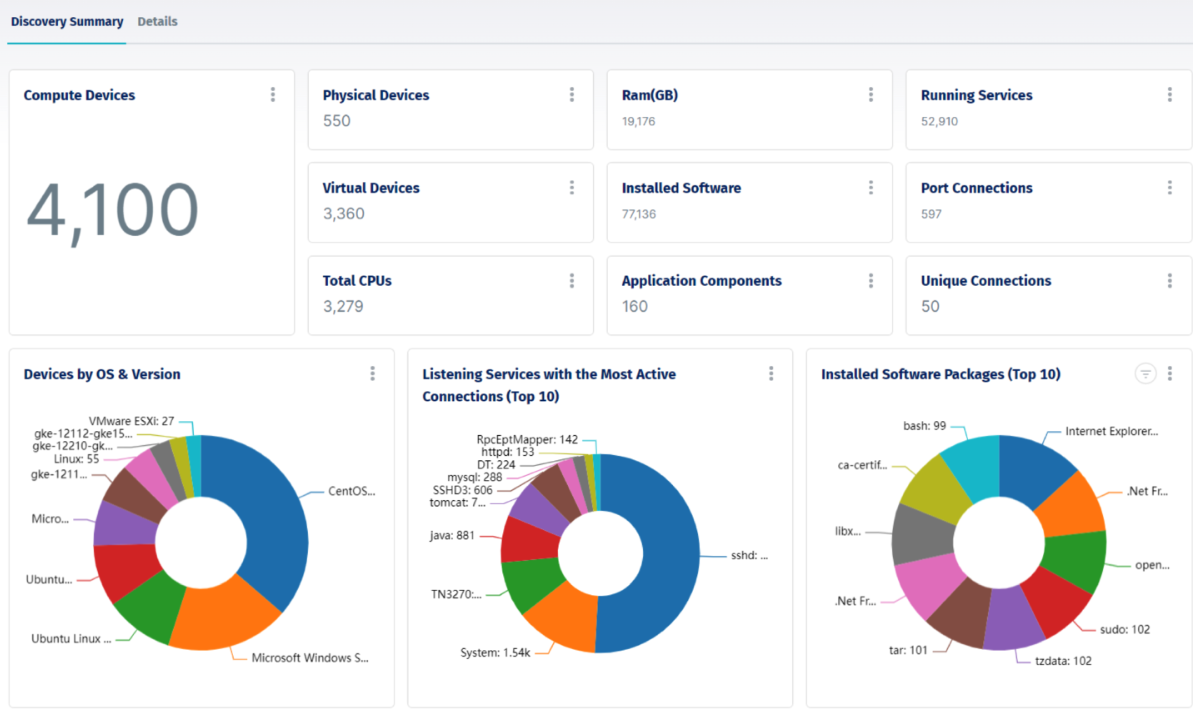
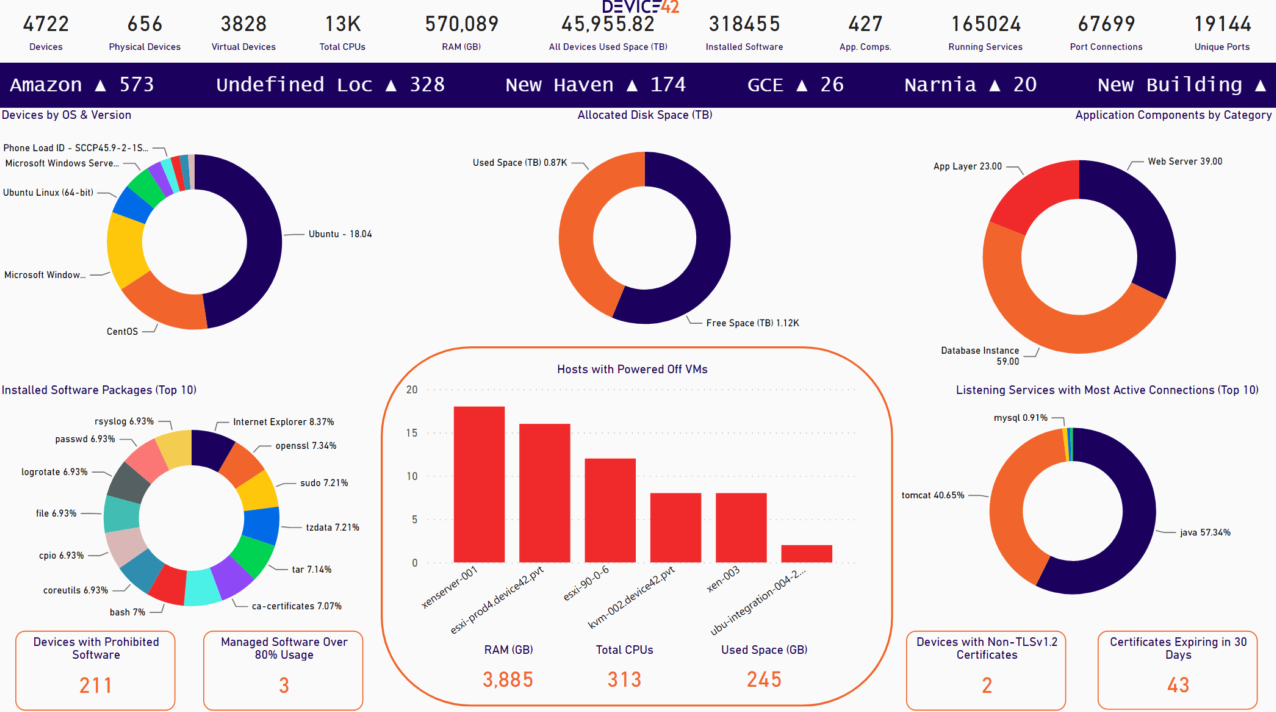
Device42’s discovery summary after an automated environment scan, showing compute devices, virtual machines, installed software, and running services discovered across a heterogeneous infrastructure.
With goals defined, the next task is mapping application dependencies, and this is where many migrations run into trouble. Teams discover mid-migration that moving application A breaks application B because a direct database connection or a hard-coded IP address was never documented. Dependency mapping surfaces these connections before they become incidents.
Manual dependency documentation is rarely complete. Automated application dependency mapping (ADM) tools query active network connections, open ports, and process data to generate an accurate picture of which services communicate with which. Device42’s application dependency mapping builds these maps from discovered data and can automatically generate affinity groups, ensuring migration waves reflect actual dependency chains rather than assumptions.
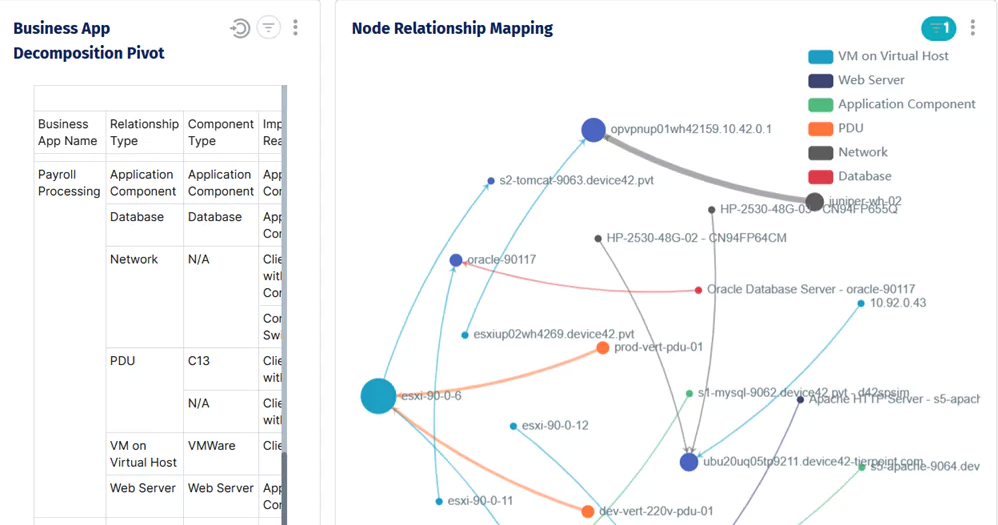
Node relationship mapping for a single business application, showing every infrastructure component.
Before moving to design, review your security and compliance obligations. If your workloads are subject to HIPAA, PCI-DSS, SOC 2, or similar frameworks, those requirements need to shape your cloud architecture, not be retrofitted onto it after the fact.
Design
With a clear picture of what you’re moving and where the risks are, the design phase translates assessment findings into a concrete plan.
The first decision is your cloud model: public, private, or hybrid. For most organizations migrating general-purpose workloads, a public cloud provider like AWS, Azure, or GCP is the default choice. Hybrid architectures make sense when data residency requirements, latency constraints, or regulatory obligations prevent full adoption of the public cloud. Private cloud is typically reserved for highly regulated environments where direct infrastructure control is non-negotiable.
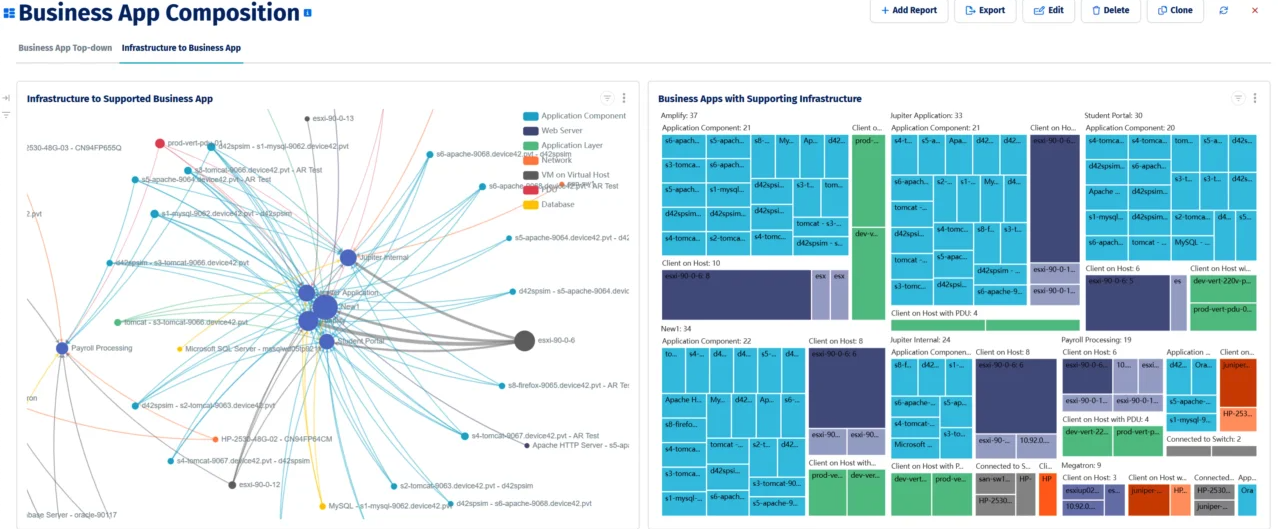
Device42’s application dependency map shows business applications and their supporting infrastructure components, used to identify migration wave groupings before any workload moves.
Structure the migration as a series of phases, each aligned with a dependency wave from your assessment. Phased migration limits the blast radius of any single failure and gives you natural checkpoints to validate before proceeding. Each phase should have explicit go/no-go criteria (a list of validation checks that must pass before the next phase begins) and a rollback procedure that the team has actually rehearsed, not just written down.
Right-sizing also deserves attention during design. Migrating on-prem specifications one-for-one to the cloud usually replicates inefficiencies at a higher cost. A good migration readiness tool scores each business application by infrastructure complexity, estimates monthly cloud costs based on discovered resource utilization, and classifies workloads as rehost or replatform candidates. This gives you the data to make right-sizing decisions before committing to a cloud architecture.
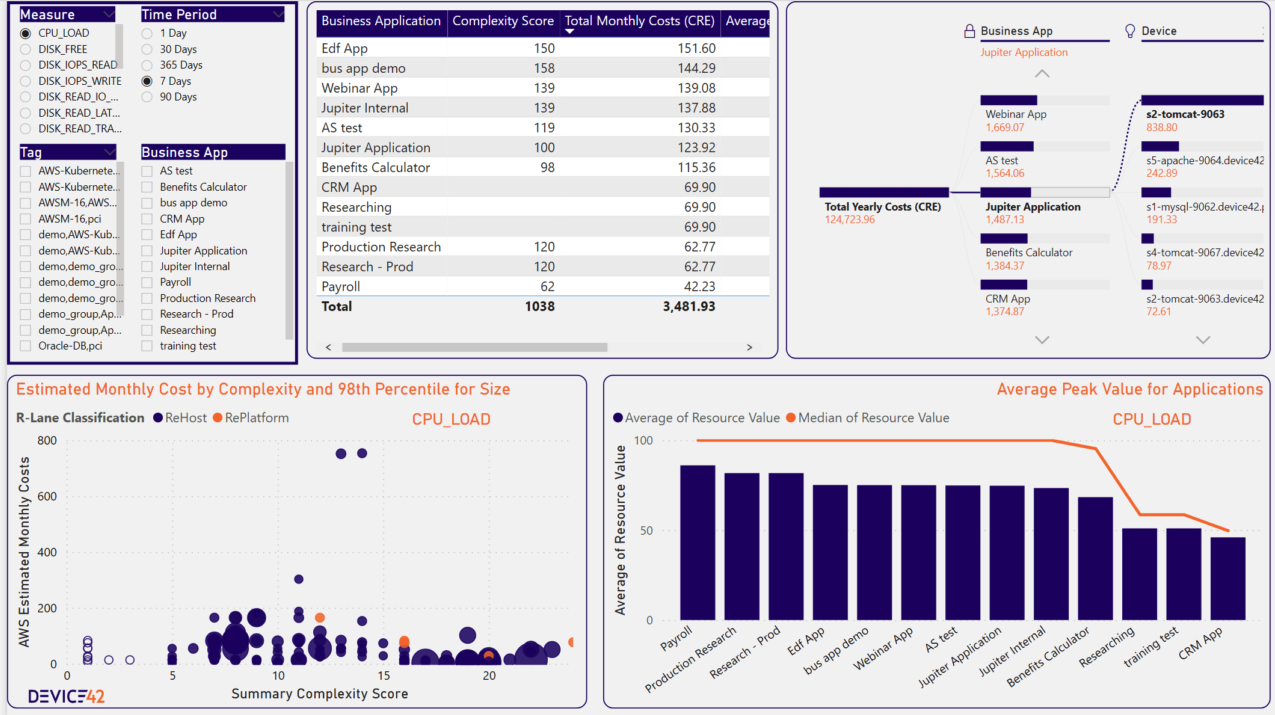
Device42’s migration readiness dashboard shows application complexity scores, estimated AWS monthly costs, and rehost vs. replatform classification to support wave prioritization and right-sizing decisions.
Execution
With a phased plan and rollback procedures in place, you’re ready to start moving workloads, which is where the real complexity begins. No migration plan survives contact with reality completely intact: Dependencies get missed, cloud services behave differently than expected, and teams encounter edge cases nobody anticipated. The practices below don’t eliminate those surprises, but they keep them manageable.
Laying the groundwork
Before any workload moves, the cloud environment must be stable and properly configured. Set up your IAM policies first, applying least-privilege access from the start rather than defaulting to broad permissions and tightening later. Configure your VPC architecture, networking rules, storage classes, and container registries so that migrated workloads land in a well-structured environment rather than an ad hoc one. This step is often treated as a formality, but IAM misconfigurations and network gaps are among the most common causes of post-migration incidents.
With the environment ready, don’t start with your most important workloads. Pick something non-critical for your first migration and treat it as a live rehearsal. That can be an internal tool, a development environment, or a low-traffic service. The goal is to validate that your migration tooling works as expected, your monitoring correctly picks up the migrated workload, and your rollback procedure actually works. Finding a gap in your process on a non-critical asset costs far less than finding it mid-migration on a production database.
Migrating in phases
With the groundwork validated, begin migrating workloads in the dependency order established during planning. Moving systems out of sequence, even when it seems convenient, creates integration failures that are difficult to diagnose and expensive to fix. Treat the wave sequence as a constraint, not a suggestion.
After each phase completes, run targeted validation tests before proceeding to the next one. These should cover:
- Functional correctness: Do the migrated applications behave as expected?
- Integration: Do connections to dependent systems still work?
- Performance: Do migrated workloads meet the latency and throughput targets from your success criteria?
- Data integrity: Is the data consistent and complete after migration?
Deferring all validation to the end of the migration means that problems compound across phases and become much harder to isolate. Catching issues phase by phase keeps them small and tractable.
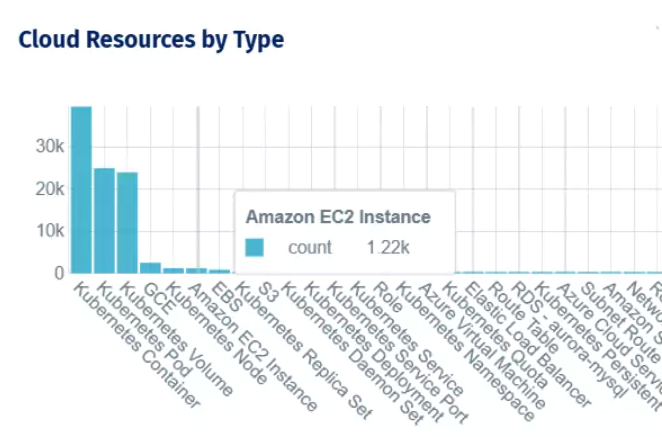
Cloud resource inventory by type after migration, covering Kubernetes workloads, EC2 instances, and Azure virtual machines across providers.
For Kubernetes workloads specifically, phased migration often involves moving applications between clusters with different distributions or configurations. When migrating from on-premises Kubernetes to a managed service like GKE, EKS, or AKS, namespace configurations and application metadata may need to be reconfigured to match the target environment. Plan for this as part of the wave-level validation checklist, not as a discovery during cutover.
Cutover
Set up monitoring and alerting before cutover, not after. By the time you go live, you should have visibility into the health of every migrated workload: CPU, memory, network throughput, application-level metrics, and error rates. Prometheus and Grafana are common choices for Kubernetes environments; CloudWatch, Azure Monitor, and Google Cloud Operations are common for managed cloud services. Define alerting thresholds based on your success criteria so that deviations from expected behavior surface immediately.
Go live only when the team has rehearsed the rollback procedure and can execute it under pressure. Define the cutover window, communicate it to stakeholders, and establish a clear escalation path if anything goes wrong during the window. A well-executed cutover is mostly boring, which is exactly what you want.
Post-migration and optimization
Going live is not the finish line. The post-migration phase is where you find out whether the environment you’ve built can hold up under real-world conditions and where the practices you put in place during planning either pay off or expose their gaps.
Post-migration discovery and environment validation
The first thing to do after go-live is to confirm that what’s running in the cloud matches what you planned to migrate. In practice, there are almost always gaps: a dependent service still running on-prem that nobody noticed, a cloud resource provisioned outside the migration plan, or a configuration that didn’t transfer cleanly. Running a post-migration discovery scan and comparing the results against your pre-migration inventory surfaces these discrepancies before they become operational problems.
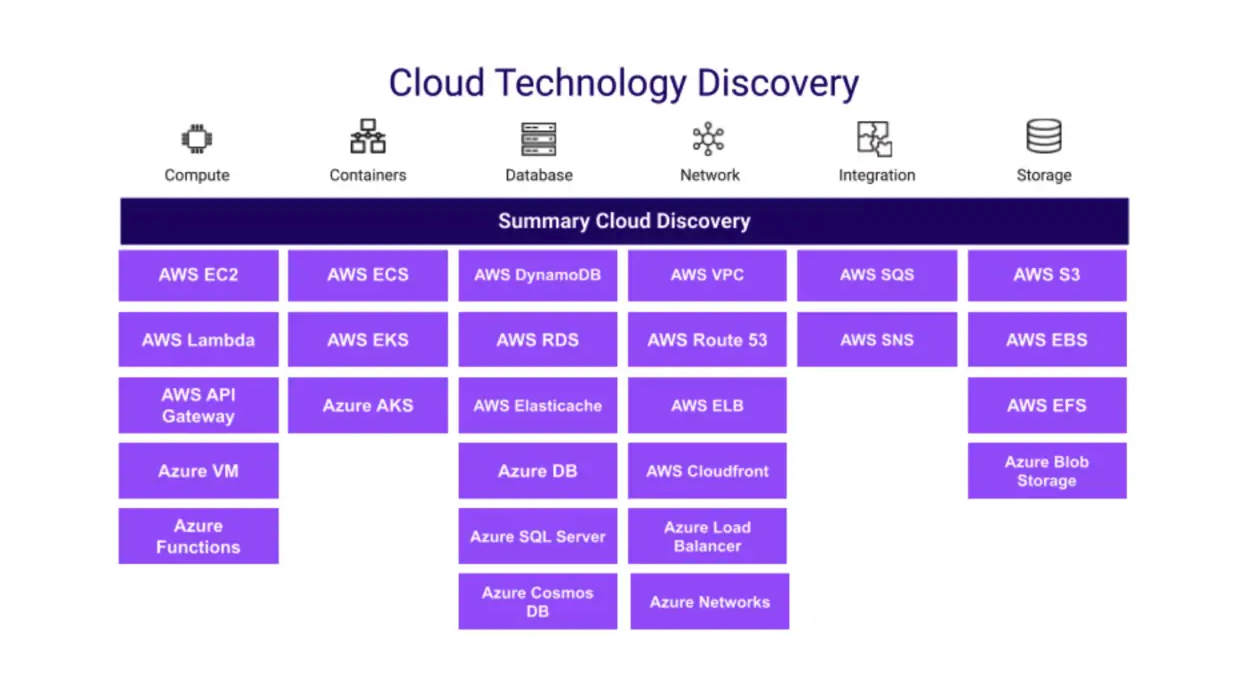
Device42’s cloud discovery coverage spans compute, containers, databases, networking, and storage across AWS and Azure.
This comparison also gives you the documentation to make decommissioning decisions with confidence. One of the riskier post-migration moves is retiring on-prem infrastructure before you’ve confirmed that everything it supported has a working replacement in the cloud. When your CMDB reflects the live environment and is continuously updated through automated cloud discovery, you can verify that every workload, dependency, and on-prem connection has a confirmed counterpart in the cloud before anything gets shut down.
Beyond workload validation, ongoing discovery surfaces the operational issues that accumulate quickly in a new cloud environment: shadow resources provisioned outside the migration plan, expiring SSL certificates on newly deployed services, and software running on cloud instances that doesn’t match your approved package list. Catching these in the first 30 to 60 days after go-live is far cheaper than finding them during a compliance audit or an incident.
Security, compliance, and decommissioning
Once you’re confident in your recovery posture, turn to security. Run penetration tests and CIS benchmark scans against the cloud environment to confirm that it meets the same security standards as your on-prem infrastructure. Cloud-native services are not compliant by default; misconfigurations in IAM policies, storage permissions, and network rules are responsible for a significant proportion of cloud security incidents, and a post-migration audit is the right time to catch them before they become problems.
Decommissioning on-prem infrastructure is one of the most consequential decisions in the post-migration phase, and it’s also one of the most commonly rushed. Keep legacy systems running longer than feels necessary. Define a stability window and begin decommissioning only once the cloud environment has demonstrated consistent behavior during that period. One practical technique before formally decommissioning on-prem servers: cut their network access and wait 30 days. If nothing complains, nothing depends on them.
Measuring outcomes and planning ahead
Once the environment is stable, go back to the success criteria defined at the start of the project and measure honestly against them. Did the migration come in on budget? Do migrated workloads meet their performance targets? Are RTO and RPO objectives being met in practice? The answers inform what needs optimization and provide the institutional knowledge that makes future migrations faster and less risky.
Cloud resource inventory by type after migration, covering Kubernetes workloads, EC2 instances, and Azure virtual machines across providers.
Invest in documentation and knowledge transfer before the migration project formally closes. Produce runbooks that cover day-to-day operations, incident response, and recovery procedures for the new environment. Document backup policies, Disaster Recovery (DR) plan configurations, and recovery steps as part of the standard handoff because the team responsible for ongoing operations needs to be able to execute a recovery without tracking down the person who set it up. Conduct structured knowledge transfer sessions rather than assuming that documentation alone is sufficient.
Finally, use the post-migration period to identify the next round of improvements. Cloud environments are not static: Workload patterns change, new services become available, and optimization opportunities emerge as usage data accumulates. Treat the end of the migration project as the beginning of a continuous improvement cycle, not a one-time event.


Fastest time to value with easy implementation and agentless asset discovery

Comprehensive hardware and software inventory management

Broadest discovery from legacy technologies to the latest cloud & containers
Conclusion
Cloud migration rewards preparation and punishes shortcuts, but the preparation that matters most isn’t the technical configuration, it’s the process discipline. Getting the assessment right before the design, running the design before the first workload moves, and validating after every phase rather than at the end are the practices that separate migrations that go smoothly from ones that become months-long recovery efforts.
The post-migration phase deserves as much attention as the migration itself. Security postures that haven’t been audited against the new environment, on-prem infrastructure decommissioned before cloud stability is confirmed, and environments that drift from the migration plan within weeks of go-live are the failure modes that show up long after the project has been declared a success.
Keeping your CMDB current through continuous discovery is what separates a completed migration from a reliable one. Validate the cloud environment against your pre-migration inventory. Measure actual outcomes against the success criteria you defined at the start. Device42’s CMDB best practices poster is a free reference guide worth keeping on hand as you build out your post-migration operations.